Karate DSL Essentials: A Practical Guide to API Test Automation
- 13 Oct 2026
Karate is a test automation framework widely used for API testing. Its concise DSL makes it possible to define HTTP requests, assertions, test data, and reusable test logic without writing large amounts of traditional programming code.
This guide covers the essential concepts you need to understand and navigate a Karate API test automation project.
Let's start!
What Is Karate DSL?
Karate is an open-source test automation framework that provides built-in capabilities for API testing and also supports other automation use cases such as UI testing, performance testing, and mocking.
For API testing, Karate allows you to:
- Send HTTP requests
- Configure headers, parameters, and authentication
- Work with JSON and XML
- Validate API responses
- Manage test data and variables
- Reuse test flows
- Run tests in parallel
- Generate test reports
- Integrate automated tests into CI/CD pipelines
One of its main characteristics is that API interactions can be expressed directly in feature files using a concise, readable syntax.
For example:
Feature: Users API

Scenario: Get an existing user
    Given url baseUrl
    And path 'users', userId
    When method get
    Then status 200
The test describes the intent of the interaction directly: configure the URL, define the resource path, send a GET request, and verify the response.
This is one of the reasons Karate can keep API tests relatively concise while still providing access to more advanced programming capabilities when they are needed.
Understanding Karate's Gherkin-Style Syntax
Karate feature files use a Gherkin syntax. If you have worked with Cucumber or similar tools, the structure may look familiar.
A feature file commonly contains:
Feature
    └── Scenario
          ├── Given
          ├── When
          ├── Then
          └── And
Feature
The Feature describes the functionality, area or process being tested.
Feature: Users API
A feature can contain one or more related scenarios.
Scenario
A Scenario represents a specific behavior or test case.
Scenario: Get an existing user
A scenario should ideally have a clear purpose rather than trying to validate an unrelated behaviors.
Given, When, Then, and And
These keywords help communicate the intent of the scenario:
- Given establishes initial conditions or setup.
- When represents the main action.
- Then describes the expected result or validation.
- And adds additional steps while keeping the scenario readable.
Karate then extends this style with its own DSL for performing API interactions and assertions directly from the feature file.
For example:
Scenario: Create a user

    Given url baseUrl
    And path 'users'
    And request
    """
    {
      "name": "John Doe",
      "email": "john@example.com"
    }
    """
    When method post
    Then status 201
The important distinction is that the feature file is not just describing the test. It also contains the instructions Karate needs to execute it.
Anatomy of a Karate API Test
A typical API test can be viewed as a simple flow:
Configuration
     ↓
Test data / setup
     ↓
Request
     ↓
Execution
     ↓
Response
     ↓
Assertions
Consider this example:
Scenario: Get an existing user

    Given url baseUrl
    And path 'users', userId
    When method get
    Then status 200
    And match response contains { id: '#number' }
Each part has a different responsibility.
Configuration
The test needs information such as the API base URL or environment-specific settings.
Given url baseUrl
The value of baseUrl does not have to be hard-coded in every feature. Shared configuration can be provided through karate-config.js.
Request
The request is constructed using Karate's DSL.
And path 'users', userId
Additional elements such as headers, query parameters, authentication, and request bodies can be configured as required.
Execution
The HTTP method determines the operation being performed.
When method get
Karate supports common HTTP methods such as GET, POST, PUT, PATCH, and DELETE.
Assertions
The response can then be validated.
Then status 200
And match response contains { id: '#number' }
Karate's match keyword provides a concise way to validate response data, including JSON structures, values, types, and more complex matching conditions.
The important idea is that the scenario should make its testing intent easy to understand.
Understanding a Karate Project
A simplified Maven-based Karate project might look like this:
karate-project/
├── pom.xml
└── src/
    └── test/
        └── java/
            ├── users/
            │   ├── create-user.feature
            │   └── get-user.feature
            ├── orders/
            │   └── get-order.feature
            ├── karate-config.js
            └── TestRunner.java
The exact organization can vary depending on the project and execution approach, but the responsibilities remain similar.
pom.xml
For Maven-based projects, pom.xml manages dependencies and build configuration.
.feature files
Feature files contain the automated scenarios.
They can be organized according to the application's functionality, for example:
users/
orders/
payments/
authentication/
Test runner
A runner provides an entry point for executing feature files and can be used to control aspects such as tags, environments, and parallel execution.
karate-config.js
This file is commonly used for shared configuration, particularly values that can change between environments.
For example:
function fn() {
    return {
        baseUrl: 'https://api.example.com'
    };
}
A feature can then use:
Given url baseUrl
instead of hard-coding the API URL.
This separation becomes especially useful when the same test suite needs to run against development, QA, or other environments.
Keeping a Karate Suite Maintainable
A test suite can work correctly and still become difficult to maintain.
As the number of scenarios increases, it becomes important to separate test intent, configuration, and reusable logic.
Organize by functionality
A simple structure might be:
features/
├── authentication/
├── users/
├── orders/
└── payments/
The best structure depends on the application, but meaningful organization makes it easier to find and maintain tests.
Keep scenarios focused
A scenario should have a clear testing purpose.
For example:
Create user with valid data
Reject user creation with missing email
Get existing user
Return 404 for unknown user
are easier to understand than generic names such as:
Test 1
Test 2
Scenario 3
Avoid unnecessary duplication
If the same configuration or setup is repeated across many scenarios, consider whether it belongs in shared configuration or reusable logic.
Karate supports reusable features and can also work with JavaScript and Java when additional logic is required.
However, reuse should have a purpose, Don't abstract everything. The goal is to make the test suite easier to understand, not to hide the behavior being tested behind layers of utilities.
A useful principle is: Keep feature files focused on test intent, and extract genuinely reusable or complex logic when it improves maintainability.
Running and Reporting Karate Tests
Karate supports different execution approaches, including JUnit-based execution, command-line execution, parallel execution, and CI/CD integration.
For larger suites, parallel execution can reduce feedback time. However, scenarios should be designed so they do not depend unnecessarily on execution order or shared mutable state.
After execution, Karate provides a native HTML report that help you understand what happened during the run. You can find it inside the target folder.
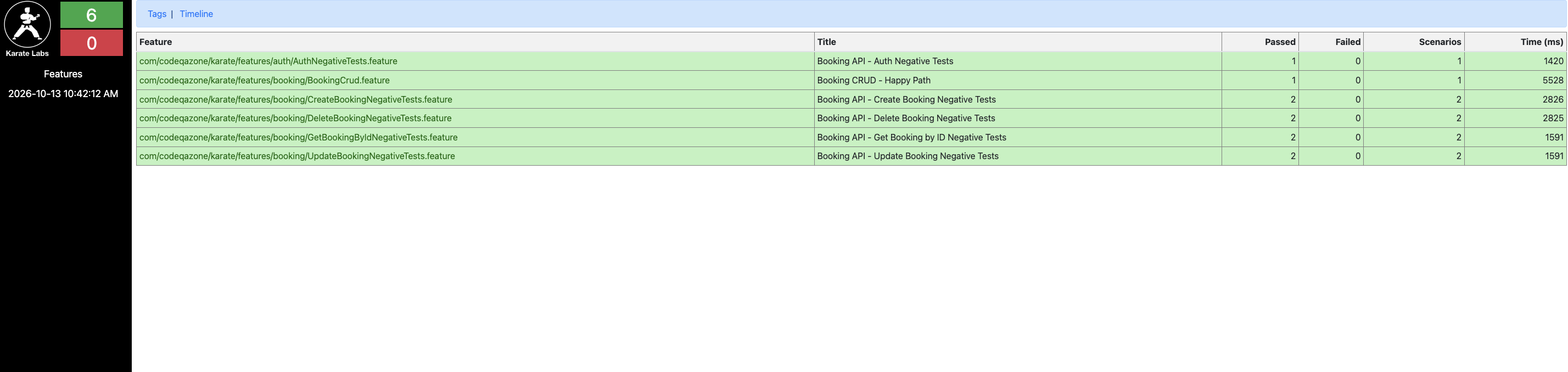
You can inspect information such as:
- Passed and failed scenarios
- Execution time
- Step-level results
- Request and response information
- Failure details
- Execution timelines
Reports are an important part of automation because running a test is only useful if the team can understand and act on its results.
Final Thoughts
These fundamentals provide a foundation for you to kick off with Karate.
From here, you can explore more specific topics such as authentication, advanced assertions, reusable features, environment configuration, CI/CD integration, debugging, and common Karate errors.